
Video voice translation
Translate the speech in any video into subtitles in your language
Choose a video on your phone, pick a language, and get accurate translated subtitles. The app recognizes the speech automatically, so the video does not need subtitles of its own.
Get it on Google PlayFree to start · Android 7.0+
- 100 spoken languages + Auto
- 130+ target languages
- Bilingual subtitles
- Export without watermark
What you get
- Automatic speech recognition: the app listens to the video and writes down what is said, with timings
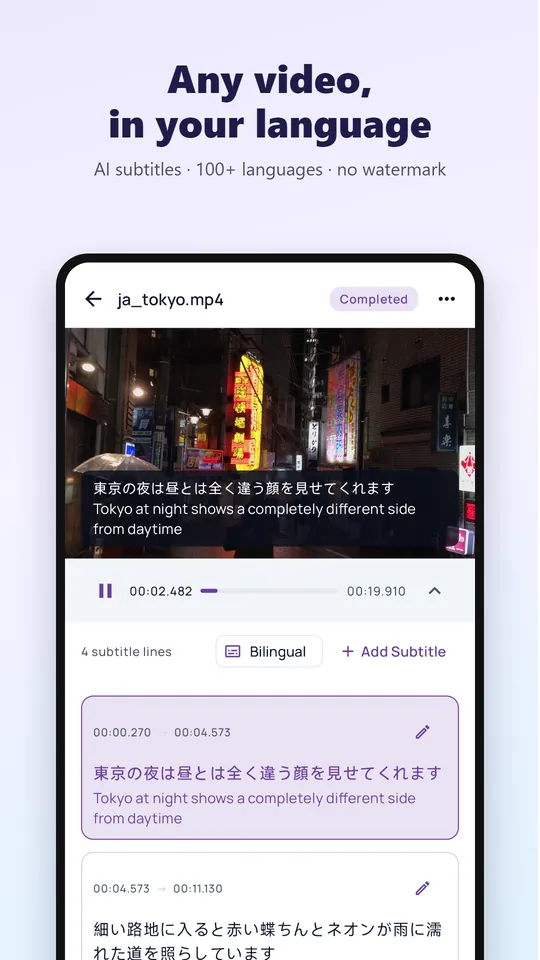
- Translation into 130+ languages, shown as bilingual subtitles (original + translation), translation only, or original only. Or choose transcription only, without translation
- A subtitle editor to fix, delete, split or merge lines, or add new ones
- Export the video with subtitles burned in (4 styles, adjustable size, color and position), as a video with embedded subtitles that viewers can switch off, or as an .srt file
- Turn the result into a dubbed video with AI dubbing
- No watermark on anything you export, on the free plan too
Works with the videos on your phone
Open one or several videos from your gallery or file manager, or share them to the app from another app such as your camera, WhatsApp or Telegram.
Keep the app open while the audio uploads. After that, recognition and translation run in the cloud: you can lock your phone or use other apps, and you get a notification when your subtitles are ready.
Only the audio track is uploaded and it is deleted after processing; the picture of your video stays on your phone. The subtitle text is kept for up to 180 days so you can open it again from History.
Free plan and VIP
Free plan: 1 video per day, up to 60 minutes each. Watch a short ad (about 30 seconds) to get 1 more video, up to 3 extra a day. VIP: 10 videos per day, up to 3 hours each, priority in the queue and no ads; VIP members can also watch ads for extra videos. Daily counts reset at 00:00 UTC.
New here? Try the 17-second sample video in the app; it does not use your daily video.
How to translate a video
Choose a video
Tap Video translation and pick a video, or share it to Video Voice Translate from another app.
Pick the languages
Set the spoken language or leave it on Auto, then choose the language you want subtitles in.
Review and edit
Watch the video with bilingual subtitles and correct any line in the editor.
Export or dub
Save the video with subtitles, export an .srt file, or create an AI-dubbed version.
Frequently asked questions
How do I get more free video translations?
Watch a short ad on the upload screen or on the “Today's videos are used up” screen: each ad adds 1 video, up to 3 a day. VIP gives 10 videos a day.
Can I translate a YouTube or TikTok video from a link?
The app translates video files saved on your phone; it does not download videos from links. If the video is playing in another app, use real-time voice translation or subtitle translation instead.
Which languages can it recognize?
Speech in 100 languages, including English, Spanish, Portuguese, Hindi, Arabic, Indonesian, Russian, Japanese, Korean, Chinese, French, German, Turkish, Vietnamese and Thai. Leave the source on Auto to detect it automatically.
How long can a video be?
Up to 60 minutes per video on the free plan and up to 3 hours with VIP.
Can I get an SRT file?
Yes. Export the translated subtitles as an .srt file and use them in any video player or editor.
Watch any video in your language
Install Video Voice Translate for free. No sign-up needed to start, no watermark on what you export.