Subtitle translation
Translate subtitles in any video app, as you watch
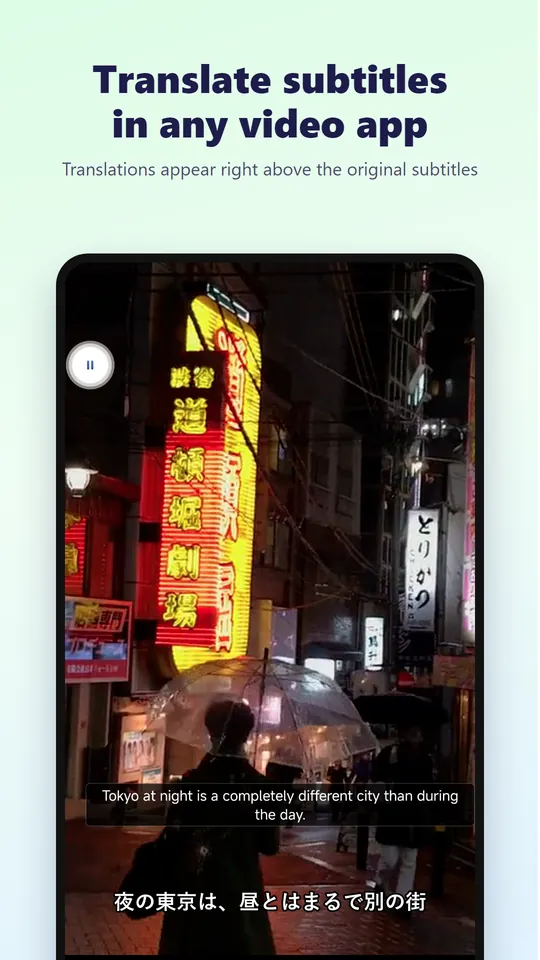
Watching a drama, anime or stream with subtitles you can’t read? Tap the floating button, select the subtitle area once, and the translation appears right next to the original subtitles, keeping up as the video plays.
Get it on Google PlayFree to start · Android 7.0+
- Works over any app
- No copy and paste
- Text recognition on your phone
- Unlimited with VIP
How it works
- A small floating button sits on top of whatever app you are using
- You mark where the subtitles are once; only that area is read
- Text recognition runs on your phone and reads Latin, Chinese, Japanese, Korean and Devanagari scripts. Cyrillic, Arabic and Thai subtitles can’t be recognized yet
- The recognized subtitle text is translated online and shown just above the original (or below it when the subtitles are at the top of the screen)
- Optional read-aloud, translation history, and adjustable font, color and opacity; drag the translation anywhere
- No keyboard or accessibility access is used
Translate subtitle files online for free
Have an .srt or .vtt file instead? Use our free online subtitle translator: upload the file, pick one of 130+ languages and download the translated subtitles with the original timings. No sign-up; up to 5 files per day, about one hour of subtitles each.
No subtitles in the video?
If the video has no subtitles at all, translate the speech instead: use video voice translation for videos on your phone, or real-time voice translation for videos playing in other apps.
Translate selected text in any app
Select text in any app and tap “Translate” in the menu, or share it to Video Voice Translate. This does not use your minutes.
Get started
Turn on subtitle translation
Open Video Voice Translate and allow it to show the floating button over other apps.
Open your video app
Start the video with foreign subtitles and tap the floating button.
Select the subtitle area
Drag a box around the subtitles once. Translations appear above them from then on.
Frequently asked questions
Is subtitle translation free?
New users get 60 minutes free. Each rewarded ad adds 20 minutes (up to 10 times a day), the task center offers more, and VIP members can use it without limits.
Does it work with Netflix, YouTube or other apps?
It works over any app that shows subtitles on screen. Some apps block screen capture for protected content; in that case the subtitles cannot be read.
Watch any video in your language
Install Video Voice Translate for free. No sign-up needed to start, no watermark on what you export.