
YouTube, TikTok and more
Understand YouTube and TikTok videos in any language
Keep watching in the YouTube or TikTok app and see live captions in your language on top. Clips saved on your phone can be translated into full subtitles or an AI voice-over.
 Free to try · No watermark
Scan with your Android phone to install
- Works over the app you watch
- Live captions
- 100 spoken languages
- 130+ translation languages
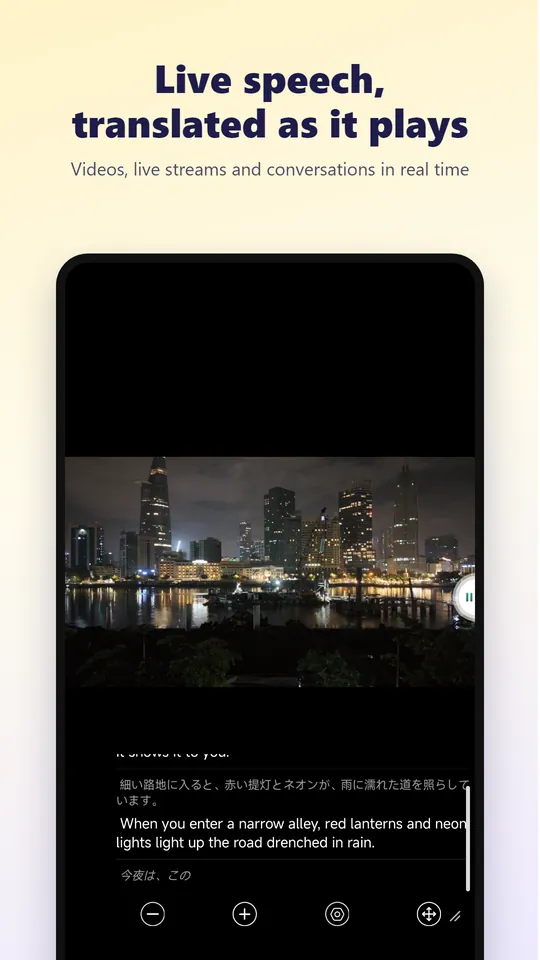
Three ways to understand any clip
- Real-time voice translation: the app listens to what is playing and shows live captions in your language (phone audio on Android 10 and newer, or the microphone)
- Subtitle translation: the video already has subtitles? The translation appears right next to them
- Video translation: videos saved on your phone get accurate subtitles, ready to save or dub
Watch the way you like
Show the translation on top, or hide the original for a cleaner view. Live captions float over YouTube, TikTok, Instagram and any other app, so you never have to leave the video.
Speech recognition works offline for about 50 languages, for free.
How to translate a YouTube video as you watch
Choose your languages
Open real-time voice translation, pick the language being spoken and the language you want to read.
Listen to phone audio
Choose phone audio so the app hears what is playing.
Play the video
Open YouTube or TikTok and play the video. Live captions in your language appear on top.
Frequently asked questions
How do I translate a YouTube video on my Android phone?
Start real-time voice translation with phone audio, then play the video in YouTube. Live translated captions appear on top while it plays.
Does it work with TikTok and Instagram too?
Yes. Live captions work on top of any app you watch in, including TikTok and Instagram.
Can I get subtitles for a video saved on my phone?
Yes. Pick it in video translation to get accurate subtitles in your language, then save the video, export an SRT file or add an AI voice-over.
How many voice minutes do I get?
New users get free time to try every feature. VIP includes 30 voice minutes a month on the monthly plan and 3 hours a year on the yearly plan.
Watch your next video in your language
Join more than a million people who use Video Voice Translate. Free to try, no sign-up, no watermark.