
Any language to English
Translate any video to English in minutes
Spanish, Hindi, Arabic, Japanese or any of 100 spoken languages: pick the video and get English subtitles in minutes. Prefer to listen? Turn them into a natural English voice-over.
 Free to try · No watermark
Scan with your Android phone to install
- 100 spoken languages
- Auto-detects the language
- English subtitles or voice-over
- No watermark
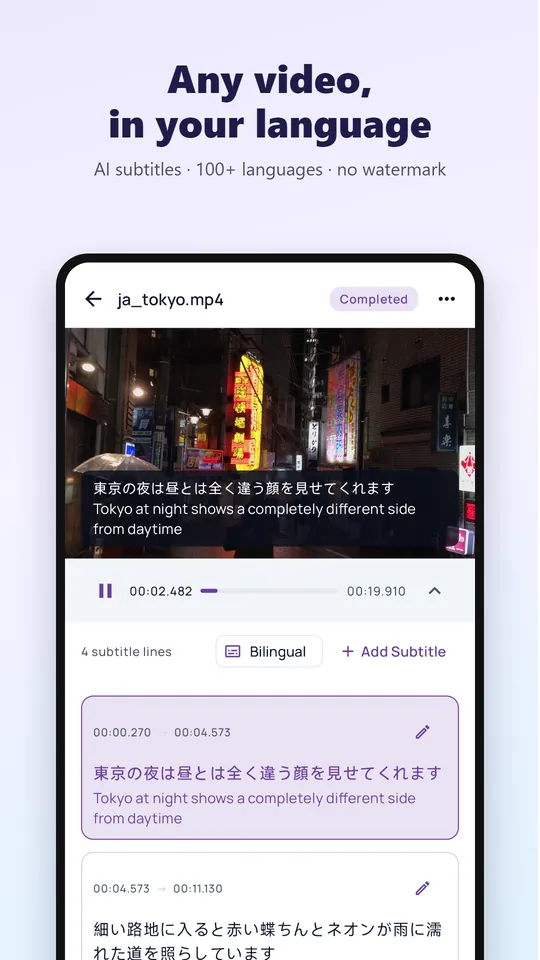
English subtitles from any video
- No need to know the original language: leave it on Auto and the app detects it
- The app listens to the speech for you, so the video needs no subtitles at all
- Bilingual subtitles show the original and the English side by side, great for learning
- Polish any line in the subtitle editor before you save
- Save the video with English subtitles, or export an SRT file
Or hear it in English
Turn the English subtitles into a natural English voice-over with AI dubbing. Choose a female or male voice and keep the original music softly in the background.
Perfect for lectures, interviews, travel vlogs and family videos you want to share with English speakers.
Long videos, private by design
VIP translates up to 10 videos a day, each up to 3 hours long, with priority processing. Only the audio is uploaded: your video stays on your phone.
How to translate a video to English
Pick the video
Open video translation and choose a video, or share it from your gallery, WhatsApp or Telegram.
Choose English
Leave the spoken language on Auto and set the target language to English.
Watch and fine-tune
Watch with English or bilingual subtitles and fix any line in the editor.
Save or dub
Save the video with subtitles, export an SRT file, or create an English voice-over.
Frequently asked questions
How do I translate a video into English for free?
Install Video Voice Translate from Google Play, pick your video and choose English. It is free to download and try, and new users get free time for every feature.
Which languages can it translate to English?
Speech in 100 languages, including Spanish, Portuguese, Hindi, Arabic, Indonesian, Russian, Japanese, Korean, Chinese, French, German, Turkish, Vietnamese and Thai. Leave the source on Auto and the app detects it.
Can I get an English voice instead of subtitles?
Yes. After translating, use AI dubbing to turn the subtitles into a natural English voice-over and save it as an MP4.
Can I translate a YouTube video to English?
Yes. For videos playing in YouTube or TikTok, use real-time voice translation for live English captions. See how to understand YouTube videos.
Watch your next video in your language
Join more than a million people who use Video Voice Translate. Free to try, no sign-up, no watermark.